An AI inbox triage that still works when the AI doesn't.
Messages come in on a webhook. An LLM labels each one by category and urgency. Code checks the answer before anything trusts it. When the model is down or replies with junk, the messages still get routed and nothing is lost.
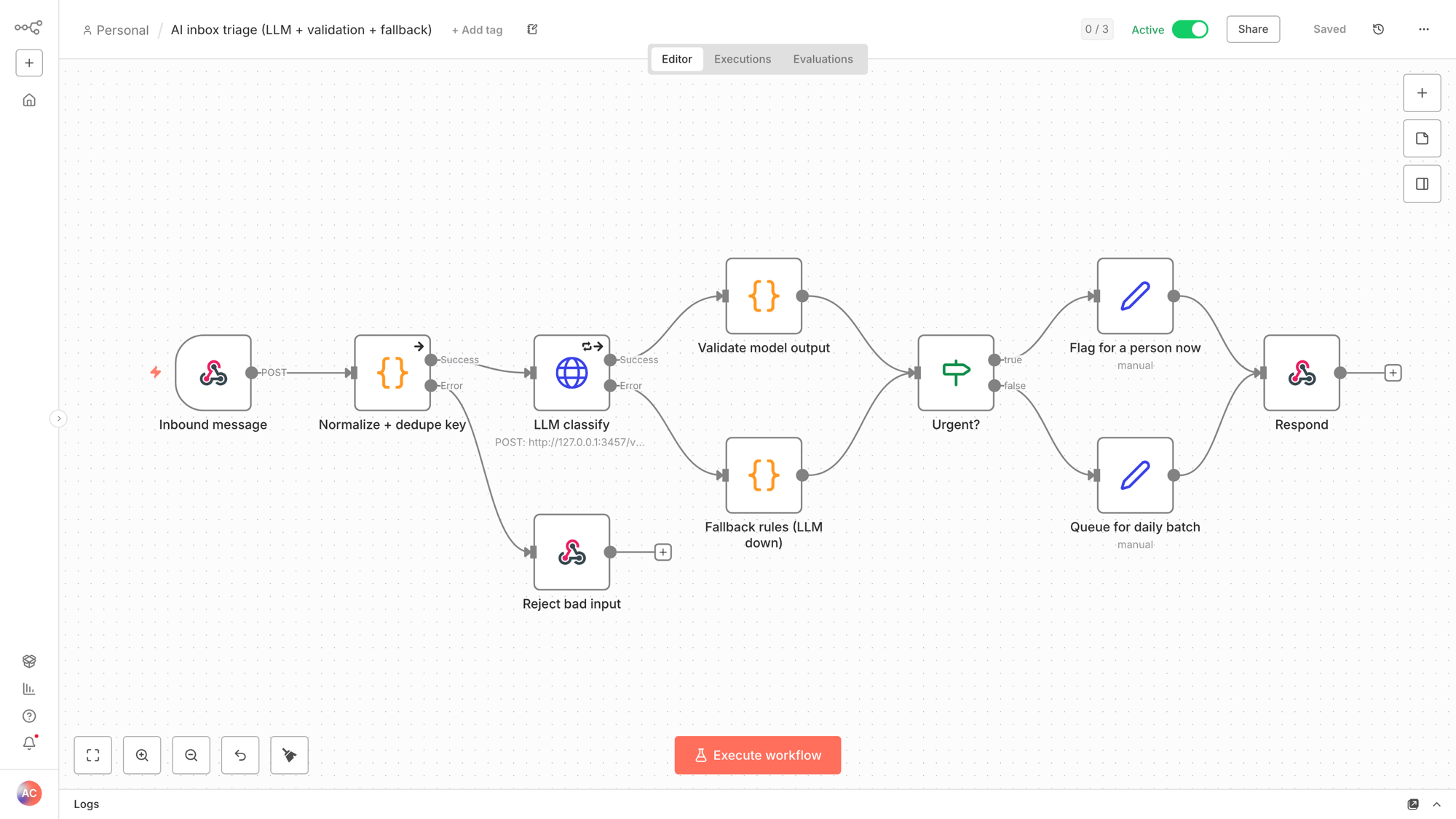
What breaks most AI automations, handled
Getting a demo to work once is easy. These are the four places a demo usually breaks once it's in production.
The LLM request asks for JSON mode, and a Code node then checks every field against an allowed list. Anything off-list goes to a person, never downstream.
Three retries, then the error branch runs a keyword classifier. Invoices still go to billing and "ASAP" still pages someone.
An empty payload gets a clean 400 invalid_input, not a silent 200 with no body.
Every message gets a stable content hash, so a retry storm or a forwarded copy can be dropped before it reaches the CRM.
Real test runs
Five requests sent to the live webhook on Nov 2, 2026. These are the actual responses.
| Inbound | Label | Action | Path |
|---|---|---|---|
| "Pricing for 3 locations?" from a dental group | sales_lead · normal · 0.9 | queued | LLM |
| "URGENT checkout is down" (Shopify webhook) | support · high · 0.95 | alert_on_call | LLM |
| "Rank #1 on Google guaranteed!!!" | spam · low · 0.9 | dropped_spam | LLM |
| "Refund ASAP, double charged" with the model unreachable | billing · high · 0.4 | alert_on_call | fallback rules |
| Empty body | — | HTTP 400 | input guard |
Adapting it to your stack
- Model: the classify node calls any OpenAI-compatible endpoint. To use OpenAI, Claude, Groq or a local model, swap the URL and add a credential.
- Source: replace the webhook with a Gmail, Outlook, Intercom or form trigger. The normalize step is the only part that needs to know the shape.
- Destinations: the two Set nodes are where Slack, HubSpot, a ticket or an SMS go. Urgent and queued are already split.